Help · 3 min
Set your reference negotiation
Enter the discount you usually give: bepleez negotiates from there, giving away less on average.
The goal
You stay in control of your margin: you choose the negotiation style and your reference negotiation, the discount you would usually give on these products. It is bepleez's benchmark, and it aims to give away less than it.
How to do it
- Dashboard: Strategies menu, then your strategy.
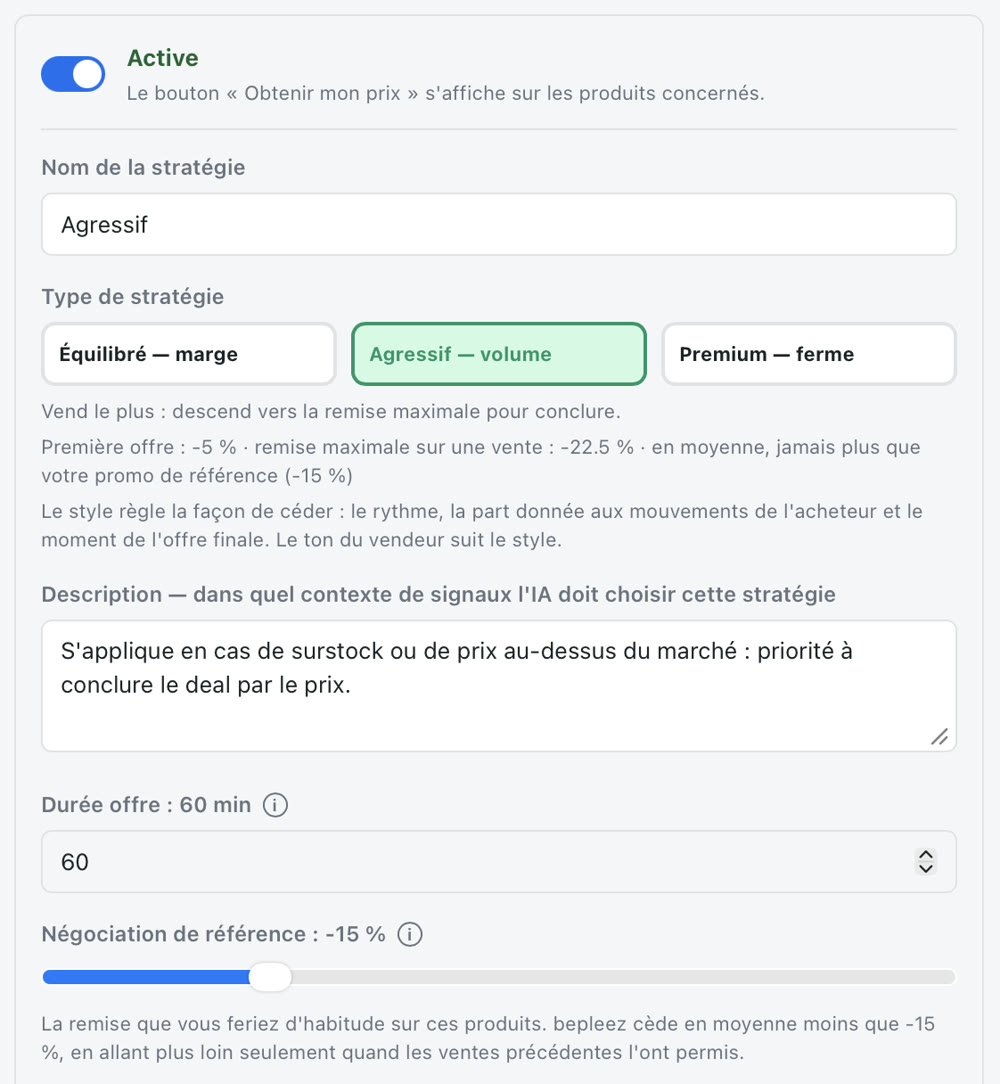
- Pick the style:
- Balanced — margin: follows what each buyer is willing to pay;
- Aggressive — volume: goes more readily toward the maximum discount to close;
- Premium — firm: small gestures, final offer early.
- Set the Reference negotiation with the slider (for example -15%): it is the discount you would usually give on these products. With the chosen style, it sets the negotiation range; the screen shows below it the first offer and the maximum discount on a sale for that style.
- Save, then click Mark as done in the progress block.
Good to know
On average, bepleez gives away less than your reference negotiation. At the start, no sale goes beyond it; afterwards, it only goes further when previous sales allowed it.
How you know it's done
This step can't be detected automatically, because a default value is saved as soon as the strategy is created. Once you've checked your settings, confirm with Mark as done.
It doesn't work?
- I can't find the setting: it is in the strategy's own card, not in the general settings.
- I want to be more cautious: start with the Premium — firm style and a low reference negotiation. You can widen it later.
A question, or stuck? Write to us: hello@bepleez.com